After helping out a buddy with the job title of Data Analyst, who experienced some light Postgres “bucketing” woes - and given the fact that this was not the first such occasion in that area over the years, though I’d help future googlers / LLM-ers out a bit as well, as I’ve seen quite some weird and inefficient solutions to a somewhat basic task of understanding a numerical column’s data distribution in a simple and easily understandable visual representation. Workarounds? Think something like - exporting the full column data to a text file and loading it into a Jupyter notebook dataframe, all while hoping things will fit in memory and won’t crash🤞…
Basically what was needed was some quick SQL for a nice and readable “histogram” type representation, that would be:
- fast, i.e. running fully inside the DB with minimal repetition / re-scanning
- visually comprehensible
- no unwanted extra buckets
- in addition to bucket counts, value ranges should be visible as well
Issues with “default” bucketing
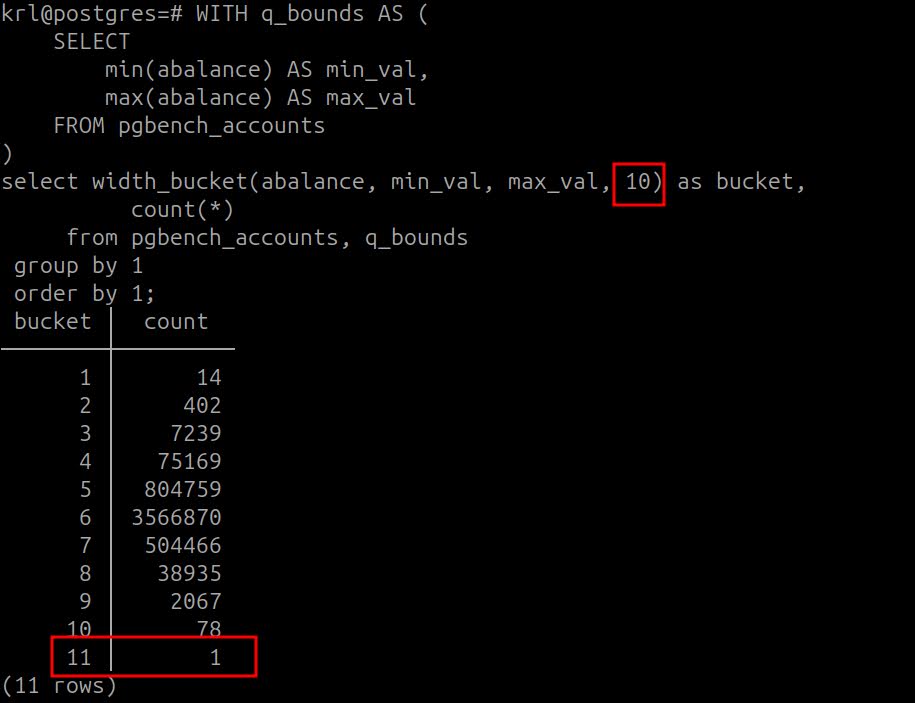
The issue with the default width_bucket() implementation?
In short - for runtime calculated min/max it produces an extra bucket row (see here for Postgres source code comments and reasoning on that) with one value! Which seems is just superfluous / confusing for data wranglers in practice… Well it can be of course worked around with a bit of extra SQL …as always the case with SQL, and as I did in below implementation. But then there’s the missing visual representation and value range indication side as well…
For visual indication - the default usage looks something like that:
By the way, the extra bucket problem would disappear automatically if the 2nd width_bucket()
form with array input would be used. This path though seems is not that popular on the interwebs - as probably results
in a much longer SQL…which for the fun of it by the way I tested on my own skin here :)
So to rectify the issues, find below an improved width_bucket() version (which probably could be simplified even more)
based on the always useful “pgbench” schema, with an easily configurable bucket count and max “bar chart” width in the 1st CTE.
SQL for simple equally chunked and fast bucketing
WITH q_buckets AS (
    SELECT
        10 AS buckets,
        100 AS max_bar_width,
        '■' AS bar_char
),
q_bounds AS (
    SELECT
        min(abalance) AS min_val,
        max(abalance) + 1 AS max_val -- to avoid the extra bucket!
    FROM pgbench_accounts
),
q_bucketed AS (
    SELECT
        width_bucket(abalance,
            (select min_val from q_bounds),
            (select max_val from q_bounds),
            (select buckets from q_buckets)) AS bucket,
        count(*) AS bucket_items,
        min(abalance) AS bucket_min,
        max(abalance) AS bucket_max
    FROM pgbench_accounts
    GROUP BY 1
    ORDER BY 1
),
q_bucketed_range_corrected AS (
    SELECT
      bucket,
      bucket_items,
      -- "case when" to restore the correct last bucket upper bound value
      int4range(bucket_min, case when bucket = (select buckets from q_buckets) then bucket_max - 1 else bucket_max end, '[]') as range
    FROM q_bucketed
)
SELECT
    bucket,
    range,
    bucket_items,
    repeat((SELECT bar_char FROM q_buckets),
           (bucket_items::numeric / (SELECT max(bucket_items) FROM q_bucketed) *
             (SELECT max_bar_width FROM q_buckets))::int) AS count_as_bar
FROM q_bucketed_range_corrected;
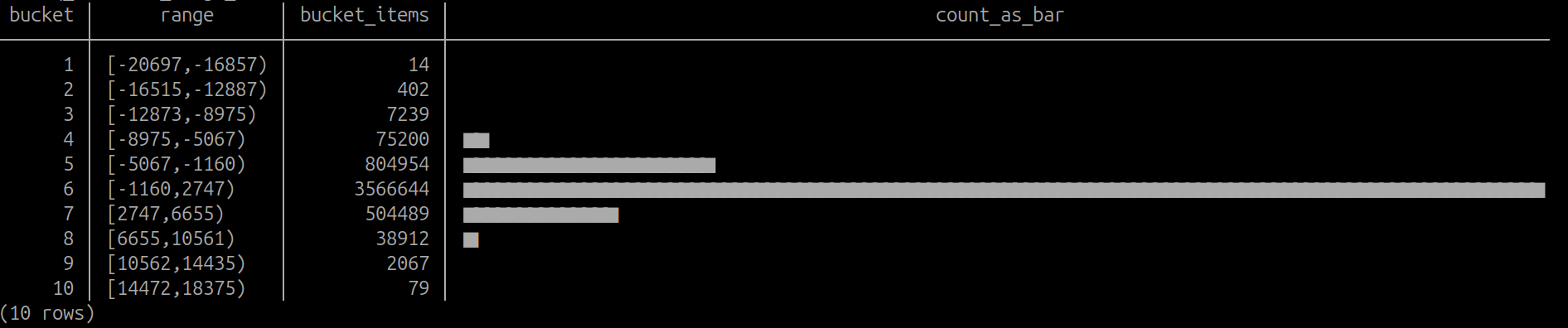
Which once executed produces something like:
A better future?
By the way, the problem space seems is not unknown to others as well, as a few Postgres blogs have touched on that before also, for example here and here (from as far back as 2014!), so maybe indeed something is not as easy as it should be. Note that the latter provides a very nice short SQL, but it has this extra “below lower bound” bucket annoyance again.
So maybe another takeaway from this example could be that it would be very nice (at least for Data Analysts / Scientist) if Postgres provided a few more convenience functions for some typical ad-hoc / exploratory data probing tasks, which seems to be a bit of a weak spot currently. Well, at least compared to some more recent DB’s like DuckDB and Clickhouse, which have some more convenience functions available around topics like - histograms, statistical profiling / summarization and cheap built-in approx “top-k” and “approx_count_distinct” type functions estimates, for which Postgres needs 3rd party extensions typically (which again are mostly not available on managed providers) or some more trickery like triggers.
PS - LLM’s, when asked in a correct way and corrected a bit, seem to be able to generate SQL similar to above as well - BUT according to my testing their implementation was about 3 (Claude) to 10x (ChatGPT) slower for whatever reason, so watch out…
PS2 Also - too lighthandedly they recommend re-purposing the internal pg_stats.most_common_freqs data - but watch out
again, as this path should only be used when you don’t have most common values (MCV-s) for the column of interest, or
they’re very fractional! But indeed - in some cases it might be useful and one can relatively easily transform
for example the built-in histogram (which by the way, can be very unrepresentative with the default “statistic target” setting on large tables!)
to something a bit more visually comprehensible…which is achievable only I guess when the statistics target is near
the default value of 100. Tough luck with free lunches as usual :)
SELECT
    ord,
    val
FROM
    pg_stats,
    LATERAL unnest(histogram_bounds::text::int[])
    WITH ORDINALITY AS t (val, ord)
WHERE
    attname = 'abalance';
Hope it helps someone one day!